White and transparent backgrounds for product photos.
CRABOY cuts the product out of the photo in your browser and puts it on pure white, a color or transparency, at one size and ratio for the whole catalog. Below, what four marketplaces ask for, read at their own pages, and the recipe that meets it.
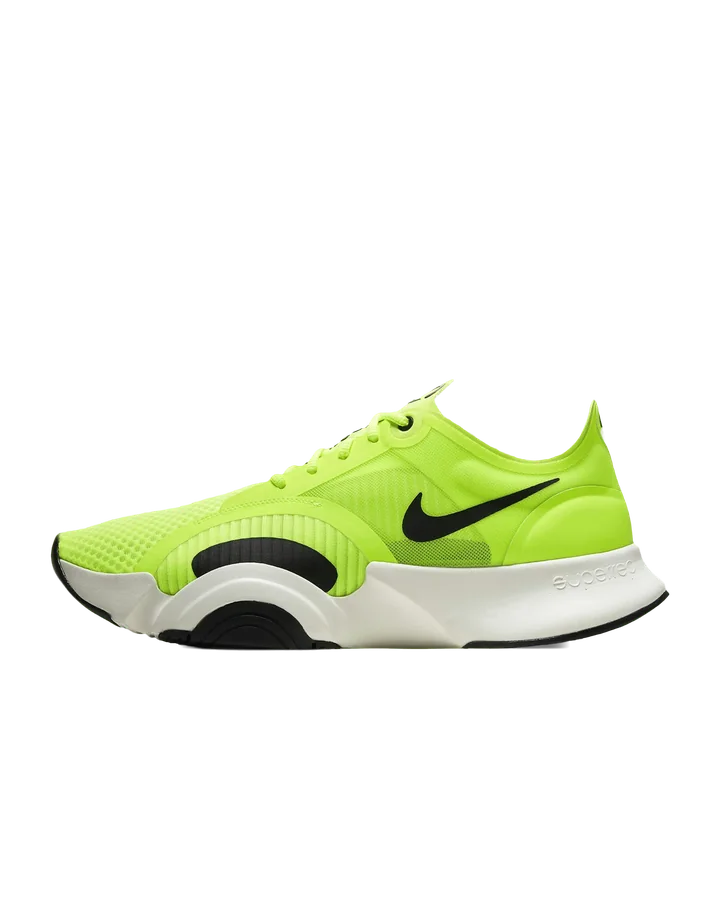
The main-image brief, in one picture
Pure white, RGB 255, 255, 255. A square frame. The product filling most of it: here the shoe’s longest side spans 85% of the frame. No text, no badge, no border.
The cutout is the shoe from the results on craboy.com, cut from a volt backdrop the same color as its upper, where the edge has to come from shape, not contrast.
What the marketplaces ask for
| Background | Size | Also | |
|---|---|---|---|
| Amazon, main image1 | Pure white, RGB 255, 255, 255 | At least 1,000 px on the longest side, for zoom | The product fills 85% or more of the frame |
| eBay2 | White is generally best; darker can suit shiny or reflective items | At least 500 × 500 px; about 1,600 × 1,600 recommended; 12 MB at most | No added badges, logos, copyright notices or watermarks; 1:1 or 16:9 look best |
| Google Merchant Center3 | No color set; a clean, unobstructed view of the item | At least 500 × 500 px for every product from 31 January 2027; around 1,500 × 1,500 or more recommended; at most 64 megapixels and 16 MB | No border, no promotional text, no watermarks |
| Shopify4 | No color set | 2048 × 2048 px usually displays best for square images; up to 5000 × 5000 px or 25 megapixels, under 20 MB | PNG is the best file type for most product images, then JPEG |
The recipe, for a whole folder
- Drop the folder into the editor: up to 500 images in one project.
- Quality: Studio; Max when the product is small in the frame or has thin parts such as straps, stems or wires.
- Background: Solid color, #FFFFFF.
- Canvas: 1:1. Scale the subject until it fills the frame, then center it, or align it to the bottom center for products that stand. Padding sets the margin from the edge.
- Export: JPEG at an exact size, for example 2000 × 2000 px, with the metadata stripped. Add a transparent PNG or WebP as a second export for your own shop. Up to eight exports at once, sorted into folders.
The settings apply to every photo in the project, and exports pad, never crop, so the whole catalog comes out the same size with the same margin. Changing the background or the size later costs nothing: the cutouts are not computed again.
White, a color or transparent
White is what a marketplace’s main image asks for or recommends. Transparent, PNG or WebP, is for your own shop or catalog: the product sits on whatever color the page has, and a new backdrop later is an export, not a new cut. A color or a gradient keeps a series consistent on social posts and banners.
The hard product shots are the ones whose background resembles the product: the shoe on a backdrop of its own color, the bag on a striped blanket that runs through its handles, the glass vase with stems seen through it. Each is on the home page with the original beside the cutout.
Sources
- Main image requirements, posted by Amazon staff on the Amazon Seller Forums, read 18 October 2026; Amazon’s full image guide (Seller Central help page G1881) needs a seller sign-in.
- Adding pictures to your listings, eBay Help; read 18 October 2026.
- Image link [image_link], Google Merchant Center Help; read 18 October 2026.
- Product media types, Shopify Help Center; read 18 October 2026.